
Free website scan
See your website the way search engines, AI assistants and mail servers see it.
One outside-in check of your public site. Can a search crawler or an AI assistant reach it and quote it? How fast does it load on a phone? Are the security basics that anyone can see in order?
Free. Usually one to three minutes. Results deleted after 7 days.
What the scan checks
Three groups of checks, each answered in plain words with the technical detail one click away.
Found by search and AI
Can a crawler reach your pages, and may it quote them?
The scan reads your served robots.txt by job rather than by name. Search crawlers decide whether you appear in an assistant’s answers: OpenAI documents OAI-SearchBot as the agent “used to surface websites in search results in ChatGPT’s search features” (OpenAI, n.d.). User-fetch agents open a page when a buyer asks about you, and training crawlers such as GPTBot are a separate decision.
It then asks for your homepage as a browser and under each crawler’s name, to see whether a firewall answers them differently. It counts the words readable without JavaScript, and reads the page tags on a sample of pages: Google treats noindex as “Do not show this page” in results and nosnippet as “Do not show a text snippet” (Google, n.d.-a). A stray tag can hide a page you meant to publish. Sitemap and structured data are checked too.
Speed
How the homepage loads on a phone
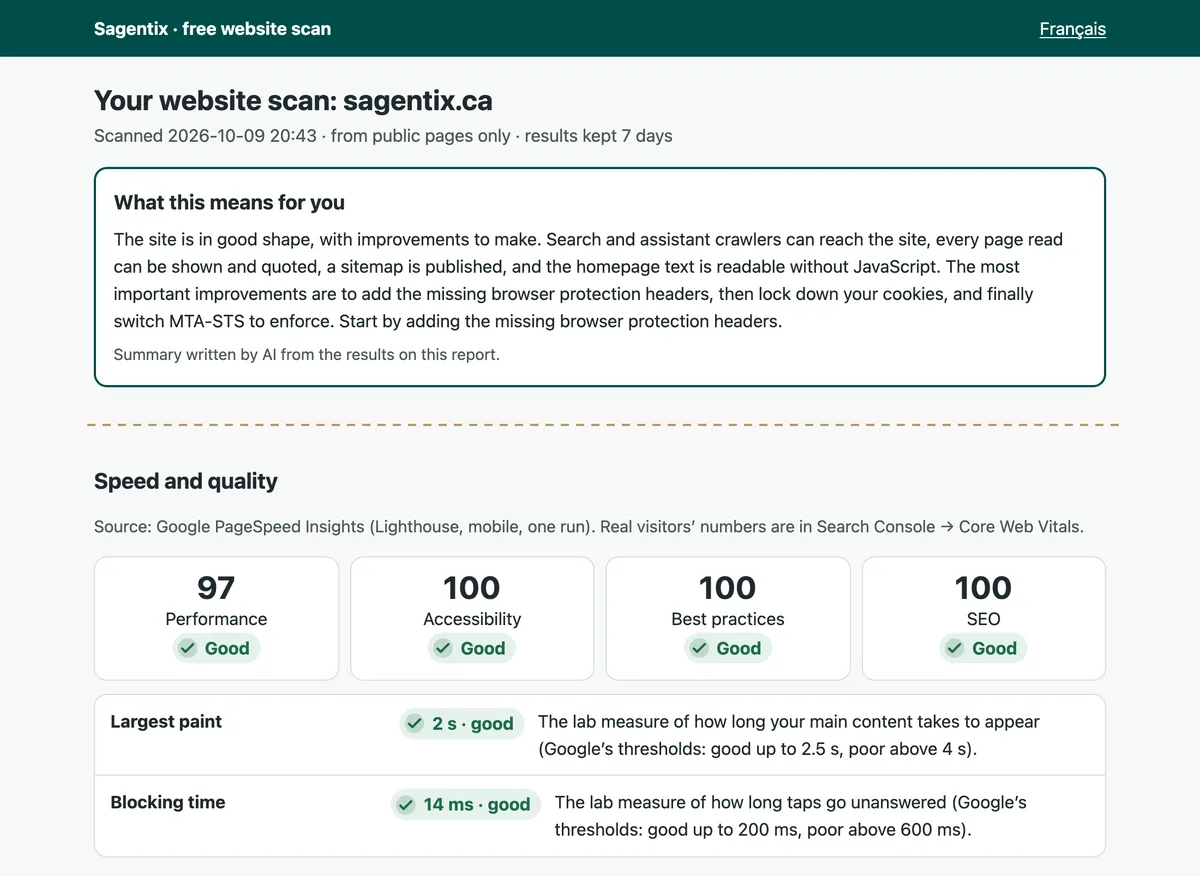
One mobile run of Google PageSpeed Insights, which “uses Lighthouse to analyze the given URL in a simulated environment for the Performance, Accessibility, Best Practices, and SEO categories” (Google, n.d.-b). These are lab numbers. What real visitors experience is in your Search Console Core Web Vitals report, and the report says so.
Passive security
What any visitor or mail server can already see
Encryption first: the HTTPS redirect, the certificate and its key, whether TLS 1.0 and 1.1 are switched off, and one canonical host. Then the six browser security headers the OWASP Secure Headers Project describes (OWASP Foundation, n.d.-b): HSTS, Content-Security-Policy, X-Frame-Options, X-Content-Type-Options, Referrer-Policy and Permissions-Policy, plus cookie flags and mixed content.
The JavaScript libraries your pages load are matched against two lists of known vulnerabilities: retire.js, built “to help you detect use of version with known vulnerabilities” (Retire.js, n.d.), and the OSV.dev open-source vulnerability database (OSV, n.d.). Email authentication is read from DNS: SPF (Kitterman, 2014), DMARC (Herr & Levine, 2026) and MTA-STS (Margolis et al., 2018), which together tell other mail servers how to treat mail that claims to come from you.
Passive by design
It reads what any visitor, search crawler or mail server can see, and stops there.
That boundary is what makes the scan safe to run on any site you manage: one ordinary request per page, no port scans, no guessed paths, no logins and no test payloads. It also sets the limit of what an outside reading can tell you.
Risks such as A01 Broken Access Control and A05 Injection in the OWASP Top 10:2025 (OWASP Foundation, n.d.-a) live inside the application. Finding them means sending crafted requests, which takes the owner’s written authorization and a qualified penetration tester. Where the report touches an OWASP category, it names it, so you can take the finding to that conversation.
Site owners who see SagentixWebsiteScan/1.0 in their logs can read what each scan asks of a site (at most 120 requests, one connection at a time) and how to opt a domain out, on the scan’s about page.
An outside-in check, not a security test or certification.
Sample: sagentix.ca
Our own site, scanned on 9 October 2026. Two excerpts from the report: the AI-written summary at the top, and the speed results from Google PageSpeed Insights.
A report page and a two-page PDF
Tiles at a glance, the three fixes to make first, and every check with its technical detail. The PDF is the same sheet founders take home from our workshops.
A fix plan and a ticket for your webmaster
Step by step, by platform where it matters. The plan is built in your browser from the link, so its details are never sent to us.
How long it takes
Usually one to three minutes, a little longer if the scanner is waking up. Up to three scans a day from one connection; a site scanned in the last 24 hours shows that result.
Privacy and the AI summary
The scan result, the two-page sheet and any email address are deleted 7 days after the scan. Your IP address is never stored: a salted one-way hash, reset daily, counts the three scans a day and expires after 48 hours.
An AI model writes the summary at the top of the report from the scan results only, never your pages or your details. The AI provider keeps no data (zero data retention) and is SOC 2 Type 2 audited. You agree to this on the form before the scan starts. The full notice is on the scan’s privacy page.
Questions people ask before they scan
Is the scan really free?
Yes. There is no account, no payment and no follow-up sequence. You can leave an email address to receive the report link once; that is optional, and it is deleted with the result after 7 days.
Can I scan a site I do not own?
Only with permission. The form asks you to confirm that you own or manage the site, or have the owner’s permission to scan it. Even so, the scan reads only what any visitor can see.
Will it slow my site down or set off a security alert?
It is built not to. It reads a handful of public pages as an ordinary visitor would, asks for the homepage once under each crawler name it checks, and has Google PageSpeed Insights load the homepage once. It does not scan ports, guess paths, log in or send test payloads.
How long does it take?
Usually one to three minutes, a little longer if the scanner is waking up. One connection can start up to three scans a day, and a site scanned in the last 24 hours shows that result instead of a new scan.
Who writes the summary at the top of the report?
An AI model, from the scan results only: never your pages and never your details. The AI provider keeps no data (zero data retention) and is SOC 2 Type 2 audited. Every number in the summary must already appear in the results, or the report falls back to a fixed-sentence summary.
Is the report available in French?
Yes. Every report has a Français link at the top, and the two-page PDF and the fix plan have French editions.
Does it replace a penetration test or a certification?
No. It is an outside-in reading, the right first step before either. Testing the inside of an application needs the owner’s written authorization and a qualified tester, and a certification needs an independent assessor.
Start with your own site.
The same check runs live in our accelerator workshops, where founders fix what it finds before they leave the room.
References
- Google. (n.d.-a). Robots meta tag, data-nosnippet, and X-Robots-Tag specifications. Google Search Central. Retrieved October 9, 2026, from https://developers.google.com/search/docs/crawling-indexing/robots-meta-tag
- Google. (n.d.-b). About PageSpeed Insights. Google for Developers. Retrieved October 9, 2026, from https://developers.google.com/speed/docs/insights/v5/about
- Herr, T., & Levine, J. (Eds.). (2026, May). Domain-based Message Authentication, Reporting, and Conformance (DMARC) (RFC 9989). Internet Engineering Task Force. https://www.rfc-editor.org/rfc/rfc9989
- Kitterman, S. (2014, April). Sender Policy Framework (SPF) for authorizing use of domains in email, version 1 (RFC 7208). Internet Engineering Task Force. https://www.rfc-editor.org/rfc/rfc7208
- Margolis, D., Risher, M., Ramakrishnan, B., Brotman, A., & Jones, J. (2018, September). SMTP MTA Strict Transport Security (MTA-STS) (RFC 8461). Internet Engineering Task Force. https://www.rfc-editor.org/rfc/rfc8461
- OpenAI. (n.d.). Overview of OpenAI crawlers. OpenAI documentation. Retrieved October 9, 2026, from https://developers.openai.com/api/docs/bots
- OSV. (n.d.). OSV: A distributed vulnerability database for open source. Retrieved October 9, 2026, from https://osv.dev/
- OWASP Foundation. (n.d.-a). OWASP Top 10:2025. Retrieved October 9, 2026, from https://top10.owasp.org/2025/
- OWASP Foundation. (n.d.-b). OWASP Secure Headers Project. Retrieved October 9, 2026, from https://owasp.org/www-project-secure-headers/
- Retire.js. (n.d.). Retire.js: What you require you must also retire. Retrieved October 9, 2026, from https://retirejs.github.io/retire.js/