
Free website scan
Your website is three things at once. One scan reads all three.
Each of six dimensions gets a plain label, not a single score, and every problem found comes with its fix.
- Free
- No account
- 3 to 5 minutes
- Passive: reads only what any visitor sees
- English and French
Part 1 · Sagentix Go-to-Market
A buyer
“Should I contact this firm?”
Reads your
Sales surface
- Ready for buyers
- Speed and quality
Part 1 · Sagentix Go-to-Market
Google and AI assistants
“Can I read this page and quote it?”
Reads your
Source for search and AI
- Found by search and AI
- Ready for AI agents
Part 2 · Sagentix Cyber & AI
Anyone on the internet
“Is there a way in?”
Reads your
Attack surface
- Security and trust
- Email and domain
Each dimension gets a label:✓ Good! Needs improvement✕ Poor
One scan, three pillars
Your website is a sales surface, a source for search engines and AI assistants, and an attack surface, all at once. The scan reads it all three ways in one pass.
Pillar 1
Sales surface
Ready for buyers
Can a buyer reach a person, see proof and know the next step?
Speed and quality
How fast and usable your homepage is on a phone.
Pillar 2
Source for search and AI
Found by search and AI
Can Google and AI assistants read, list and quote your pages?
Ready for AI agents
Can AI agents find, read and use your site? Cloudflare’s Agent Readiness checks, counted the way Cloudflare counts.
Pillar 3
Attack surface
Encryption
HTTPS, your certificate and up-to-date TLS.
Browser protection headers
Headers that limit injected scripts and stop other sites framing your pages.
Cookies
Safe settings on the cookies your site sets.
Software
Outdated scripts with known flaws, and version numbers on show.
Blocklist and exposure
Google’s unsafe-site list and risky services open to the internet.
Privacy and AI governance
Trackers before consent, your privacy policy and AI-use signals.
Disclosure
A security.txt file, so whoever finds a flaw knows whom to tell.
Email
Could someone send email that looks like it came from you?
Domain security
Domain lock and expiry, forgotten subdomains, lapsed hosts.
Every check in detail, why it matters, and its sources
Method version 2026-11-14.1.
How the main checks work
The main areas in more detail, with the documentation each check reads against.
Found by search and AI
Can a crawler reach your pages, and may it quote them?
The scan reads your served robots.txt by job rather than by name. Search crawlers decide whether you appear in an assistant’s answers: OpenAI documents OAI-SearchBot as the agent “used to surface websites in search results in ChatGPT’s search features” (OpenAI, n.d.). User-fetch agents open a page when a buyer asks about you, and training crawlers such as GPTBot are a separate decision.
It then asks for your homepage as a browser and under each crawler’s name, to see whether a firewall answers them differently. It counts the words readable without JavaScript, and reads the page tags on a sample of pages: Google treats noindex as “Do not show this page” in results and nosnippet as “Do not show a text snippet” (Google, n.d.-a). A stray tag can hide a page you meant to publish. Sitemap and structured data are checked too.
Finally it looks your site up in a web search service, to count the pages Google lists and to have an AI model describe your business from those results, the way an assistant would summarise you to a buyer.
Ready for AI agents
Can an AI agent find your site, read it and act with it?
The scan runs every check of Cloudflare’s published Agent Readiness ladder itself and places your site on its 0 to 5 scale: Link headers, Markdown on request, AI-crawler rules and Content Signals in robots.txt, the agent entry points (an agent skills index, an API catalog, an MCP Server Card, an A2A Agent Card, WebMCP, an AI catalog) and sign-in metadata for agents. When Cloudflare pointed an agent at its own documentation, built for agents, the agent “consumed 31% fewer tokens and arrived at the correct answer 66% faster than the average site” (Jesus & Morrison, 2026).
Few sites are there yet. Markdown on request passed on 3.9% of the most-visited sites Cloudflare Radar analysed in April 2026 (Jesus & Morrison, 2026). A missing standard is something to work on, never an urgent fix: the level measures readiness, not whether an assistant will name you.
Ready for buyers
What a buyer finds when they arrive
Read only from the pages the scan already opens: whether a buyer can reach a person, sees one clear next step, understands who you serve, finds named customers with results, reads you in French and finds how you price. Gartner found that 67% of 645 B2B buyers surveyed in 2025 “prefer a sales rep-free experience” (Gartner, 2026), and in a Bain and Google survey, 80–90% of buyers had vendors in mind before any research (Sherrard et al., 2022). The report shows what a buyer sees. It never predicts sales.
Speed
How the homepage loads on a phone
One mobile run of Google PageSpeed Insights, which “uses Lighthouse to analyze the given URL in a simulated environment for the Performance, Accessibility, Best Practices, and SEO categories” (Google, n.d.-b). These are lab numbers. What real visitors experience is in your Search Console Core Web Vitals report, and the report says so.
Passive security
What any visitor or mail server can already see
Encryption first: the HTTPS redirect, the certificate and its key, whether TLS 1.0 and 1.1 are switched off, and one canonical host. Then the six browser security headers the OWASP Secure Headers Project describes (OWASP Foundation, n.d.-b): HSTS, Content-Security-Policy, X-Frame-Options, X-Content-Type-Options, Referrer-Policy and Permissions-Policy, plus cookie flags and mixed content.
The JavaScript libraries your pages load are matched against two lists of known vulnerabilities: retire.js, built “to help you detect use of version with known vulnerabilities” (Retire.js, n.d.), and the OSV.dev open-source vulnerability database (OSV, n.d.). Email authentication is read from DNS: SPF (Kitterman, 2014), DMARC (Herr & Levine, 2026) and MTA-STS (Margolis et al., 2018), which together tell other mail servers how to treat mail that claims to come from you.
Domain, exposure and privacy
What public records and DNS say about your domain
Your domain is read from public records: its registration lock and expiry, DNSSEC, the subdomains listed in public certificate logs, any subdomain still pointing at a service that no longer exists (which someone else could claim), whether each nameserver answers for you, and whether every host your pages load scripts from still exists. Google Web Risk says whether your site is on its blocklist. When the site runs on its own server, a public internet-exposure dataset is checked for risky open ports.
On the homepage it notes third-party trackers that load before consent, the privacy policy and whether it names who is in charge of personal information, and any AI-use signal. A security.txt file tells researchers whom to contact about a security problem (Foudil & Shafranovich, 2022).
Passive by design
It reads what any visitor, search crawler or mail server can see, and stops there.
That boundary is what makes the scan safe to run on any site you manage: one ordinary request per page, no port scans, no guessed paths, no logins and no test payloads. It also sets the limit of what an outside reading can tell you.
Risks such as A01 Broken Access Control and A05 Injection in the OWASP Top 10:2025 (OWASP Foundation, n.d.-a) live inside the application. Finding them means sending crafted requests, which takes the owner’s written authorization and a qualified penetration tester. Where the report touches an OWASP category, it names it, so you can take the finding to that conversation.
Site owners who see SagentixWebsiteScan/1.0 in their logs can read what each scan asks of a site (at most 120 requests, one connection at a time) and how to opt a domain out, on the scan’s about page.
An outside-in check, not a security test or certification.
Sample: sagentix.ca
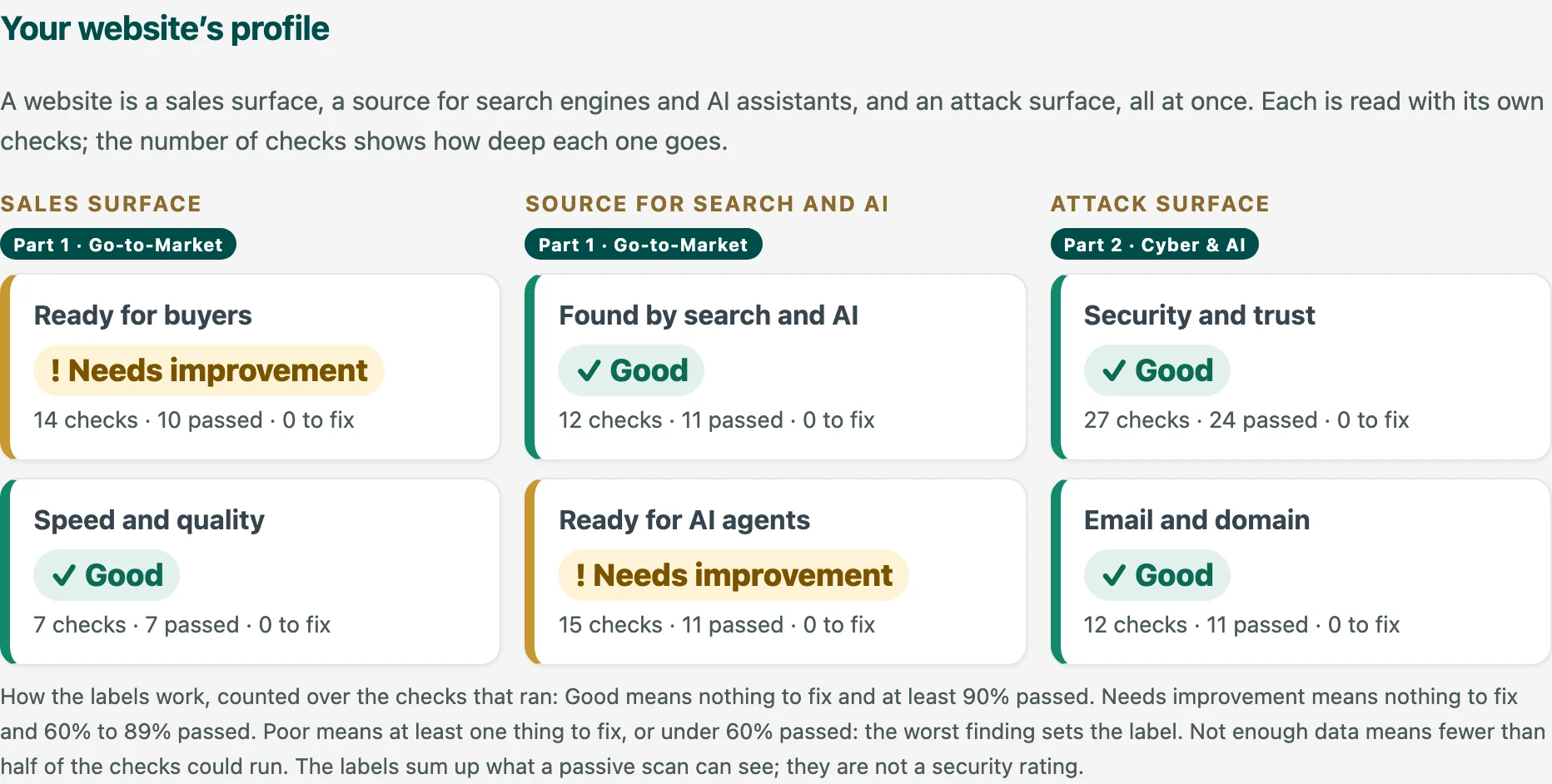
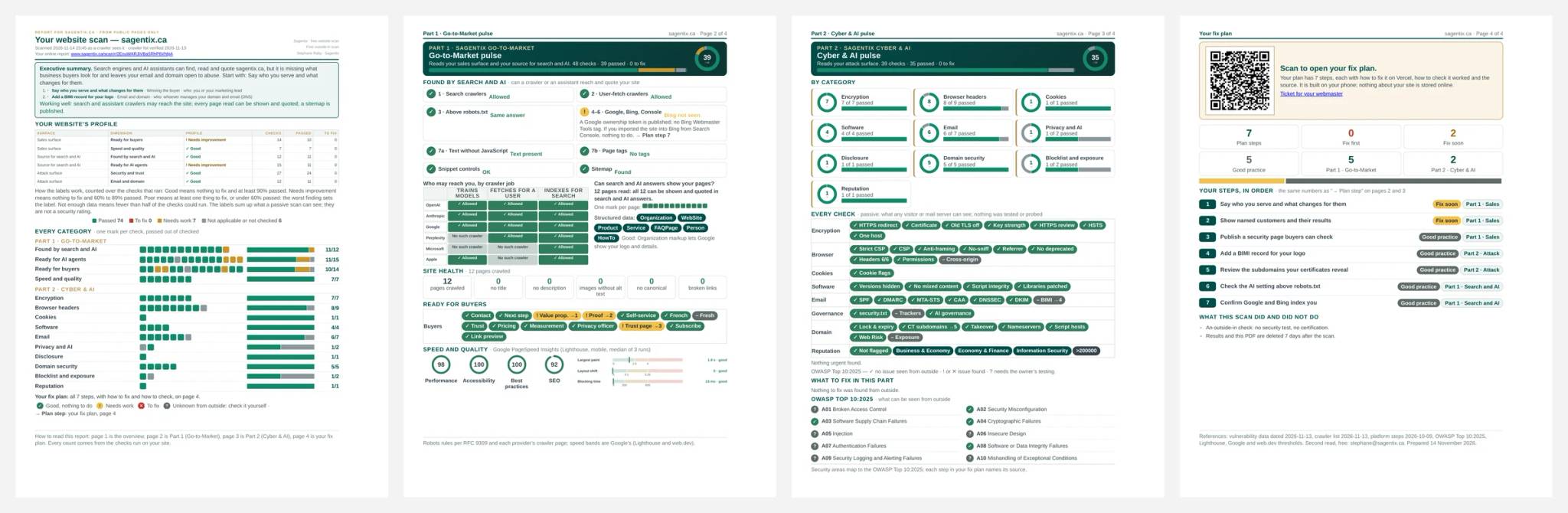
Our own site, scanned on 14 November 2026: the profile at the top of the report, and the four-page PDF.
A report in tabs and a four-page PDF
An overview that profiles your site in six dimensions (ready for buyers, speed, found by search and AI, ready for AI agents, security and trust, email and domain), each labelled Good, Needs improvement or Poor by one stated rule. Then a tab for each part with every check and its technical detail, your fix plan, and Your package with every download. The PDF has a page for the overview, each part and your fix plan, in English and French.
A fix plan and a ticket for your webmaster
A step for every problem found, by platform where it matters: what to do, implementation details for whoever runs the site (the exact record, header or setting), how to check it worked, and the sources. A ticket to paste into their tracker, and a PDF you save from your browser. The plan is built in your browser from the link, so its details are never sent to us.
The full report, for the site’s owner
Anyone can scan a site and read the public report. Add one DNS record to prove you run the site, and the report also shows the details it holds back from everyone else.
How long it takes
Usually three to five minutes, a little longer if the scanner is waking up. Up to three scans a day from one connection; a site scanned in the last 24 hours shows that result.
Privacy and the AI summary
The scan result, the four-page sheet and any email address are deleted 7 days after the scan. Your IP address is never stored: a salted one-way hash, reset daily, counts the three scans a day and expires after 48 hours. We keep a log of the scanned address, its results, the country and the page that sent you for 13 months, with no IP address, name or email, and we never use it to contact a site’s owner.
An AI model writes the summary at the top of the report from the scan results only, never your pages or your details. The AI provider keeps no data (zero data retention) and is SOC 2 Type 2 audited. You agree to this on the form before the scan starts. The full notice is on the scan’s privacy page.
Questions people ask before they scan
Why is there no overall score?
Because a total moves every time a check is added, and it hides where a site is strong or weak. Instead, the report gives each of six dimensions a label by one stated rule, in the words Google uses for page speed: Good, Needs improvement or Poor, and Not enough data when too few checks could run. The worst finding sets the label. The six sit under three pillars, because a website is a sales surface, a source for search and AI, and an attack surface at once: Ready for buyers, Speed and quality, Found by search and AI, Ready for AI agents, Security and trust and Email and domain.
Is the scan really free?
Yes. There is no account, no payment and no follow-up sequence. You can leave an email address to receive the report link once; that is optional, and it is deleted with the result after 7 days.
Can I scan a site I do not own?
Only with permission. The form asks you to confirm that you own or manage the site, or have the owner’s permission to scan it. Even so, the scan reads only what any visitor can see.
Will it slow my site down or set off a security alert?
It is built not to. It reads a handful of public pages as an ordinary visitor would, asks for the homepage once under each crawler name it checks, and has Google PageSpeed Insights load the homepage once. It does not scan ports, guess paths, log in or send test payloads.
How long does it take?
Usually three to five minutes, a little longer if the scanner is waking up. One connection can start up to three scans a day, and a site scanned in the last 24 hours shows that result instead of a new scan.
Who writes the summary at the top of the report?
An AI model, from the scan results only: never your pages and never your details. The AI provider keeps no data (zero data retention) and is SOC 2 Type 2 audited. Every number in the summary must already appear in the results, or the report falls back to a fixed-sentence summary.
Is the report available in French?
Yes. The form, every report, the four-page PDF and the fix plan all have a French edition; each report has a Français link at the top.
Does it replace a penetration test or a certification?
No. It is an outside-in reading, the right first step before either. Testing the inside of an application needs the owner’s written authorization and a qualified tester, and a certification needs an independent assessor.
Start with your own site.
The same check runs live in our accelerator workshops, where founders fix what it finds before they leave the room.
Next step, if your staff use AI agents on company systems: the AI Agent Workspace Readiness Check, part of Sagentix Cyber & AI.
References
- Foudil, E., & Shafranovich, Y. (2022, April). A file format to aid in security vulnerability disclosure (RFC 9116). Internet Engineering Task Force. https://www.rfc-editor.org/rfc/rfc9116
- Gartner. (2026, May 20). Gartner survey finds 69% of B2B buyers turn to sales reps to validate AI-generated insights [Press release]. https://www.gartner.com/en/newsroom/press-releases/2026-05-20-gartner-survey-finds-sixty-nine-percent-of-b-two-b-buyers-turn-to-sales-reps-to-validate-ai-generated-insights
- Google. (n.d.-a). Robots meta tag, data-nosnippet, and X-Robots-Tag specifications. Google Search Central. Retrieved October 9, 2026, from https://developers.google.com/search/docs/crawling-indexing/robots-meta-tag
- Google. (n.d.-b). About PageSpeed Insights. Google for Developers. Retrieved October 9, 2026, from https://developers.google.com/speed/docs/insights/v5/about
- Herr, T., & Levine, J. (Eds.). (2026, May). Domain-based Message Authentication, Reporting, and Conformance (DMARC) (RFC 9989). Internet Engineering Task Force. https://www.rfc-editor.org/rfc/rfc9989
- Jesus, A., & Morrison, V. (2026, April 17). Introducing the Agent Readiness score. Is your site agent-ready? The Cloudflare Blog. https://blog.cloudflare.com/agent-readiness/
- Kitterman, S. (2014, April). Sender Policy Framework (SPF) for authorizing use of domains in email, version 1 (RFC 7208). Internet Engineering Task Force. https://www.rfc-editor.org/rfc/rfc7208
- Margolis, D., Risher, M., Ramakrishnan, B., Brotman, A., & Jones, J. (2018, September). SMTP MTA Strict Transport Security (MTA-STS) (RFC 8461). Internet Engineering Task Force. https://www.rfc-editor.org/rfc/rfc8461
- OpenAI. (n.d.). Overview of OpenAI crawlers. OpenAI documentation. Retrieved October 9, 2026, from https://developers.openai.com/api/docs/bots
- OSV. (n.d.). OSV: A distributed vulnerability database for open source. Retrieved October 9, 2026, from https://osv.dev/
- OWASP Foundation. (n.d.-a). OWASP Top 10:2025. Retrieved October 9, 2026, from https://top10.owasp.org/2025/
- OWASP Foundation. (n.d.-b). OWASP Secure Headers Project. Retrieved October 9, 2026, from https://owasp.org/www-project-secure-headers/
- Retire.js. (n.d.). Retire.js: What you require you must also retire. Retrieved October 9, 2026, from https://retirejs.github.io/retire.js/
- Sherrard, S., Dave, R., & MacGregor, M. P. (2022, September 20). What B2Bs need to know about their buyers. Harvard Business Review. https://hbr.org/2022/09/what-b2bs-need-to-know-about-their-buyers